![CA-StateBar_Logo_Horizontal_White_LargeSeal_.png]](https://info.calbar.ca.gov/hs-fs/hubfs/CA-StateBar_Logo_Horizontal_White_LargeSeal_.png?height=50&name=CA-StateBar_Logo_Horizontal_White_LargeSeal_.png)
The instructions below will guide you to the appropriate steps based on the error message you receive or the issue you are experiencing.
- Forgot your password, Sign In Account name, security question answers, and don't know the email associated with your account
- Agency/email already exists error
Forgot password
View the Forgot Password guide.
Forgot Sign In Account name
View the Forgot Sign In Account name guide.
Forgot security question answers
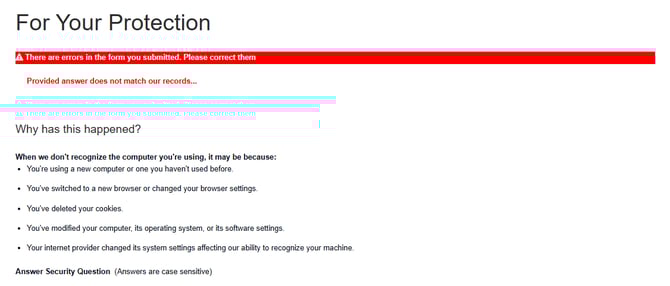
If it has been some time since you last accessed your account, you may be asked to answer a security question before accessing your account.
If you do not remember your security question answers, or if you believe your answer is correct but you continue to receive an error message, contact us for assistance.
Forgot your password, Sign In Account name, security question answers, and don't know the email associated with your account
Maintaining and managing your account access information, including the Sign In Account name, associated email address, and security question answers, is the responsibility of the account holder and/or agency. Keeping this information current will help prevent delays in accessing your account.
If you do not have this information, first check with any prior or current users of the account within your agency or firm, as they may have the correct credentials on file. If you are still unable to locate the account information, you may contact us for assistance.
Account access restricted error
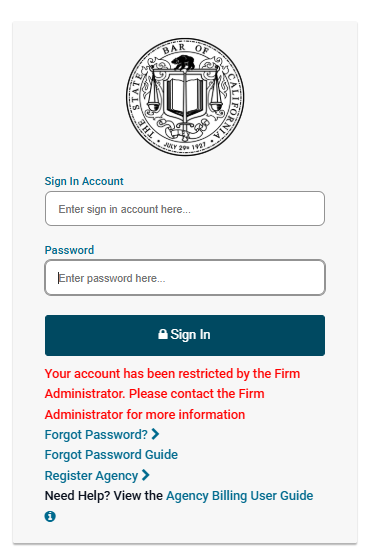
If you recently registered as a new agency and received the following error message when attempting to access your account:
“Your account has been restricted by the Firm Administrator. Please contact the Firm Administrator for more information,”
this indicates that the Agency Federal Tax ID or Social Security Number you entered during registration already exists in our system.
The Agency Billing system does not allow duplicate accounts. Each organization’s account must have a unique Tax ID or Social Security Number.
As a result, instead of creating a new agency account, you were added as an additional user to an existing account. The account’s Super Admin must approve your access before you can proceed. The Super Admin is typically the individual who originally created the account and/or serves as the primary contact for the account.
If you do not know who the account’s Super Admin is, first check with any current or prior users of the account within your agency or firm, as they may have this information. If you are still unable to identify the Super Admin, you may contact us for assistance.
Note: Maintaining and managing your account access information, including the Sign In Account name and associated email address, is the responsibility of the account holder and/or agency. Keeping this information current will help prevent delays in accessing your account.
Account temporarily locked error
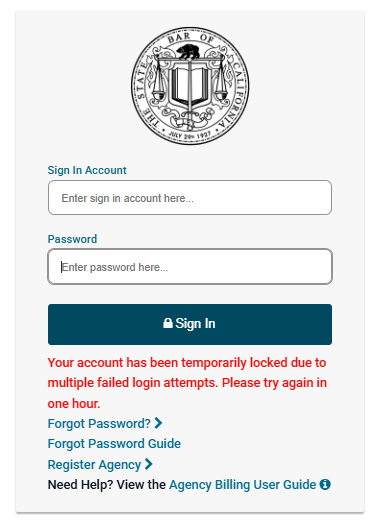
Your account has been locked due to too many unsuccessful sign-in attempts.
Please wait one hour and try again.
Invalid Tax ID/Social Security Number error
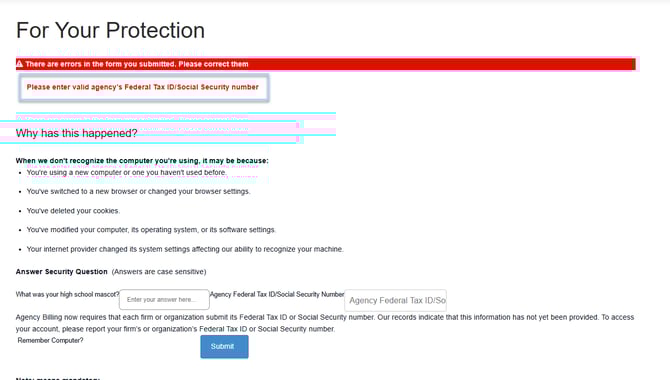
If you are a returning user and have not previously provided your organization’s Federal Tax ID or Social Security Number, you will be required to provide it before accessing your account.
If you receive the error message “Please enter a valid agency’s Federal Tax ID/Social Security Number,” it most likely means the number you entered has already been registered.
The Agency Billing system prevents organizations from creating duplicate accounts. The Tax ID or Social Security Number must be unique to each organization’s account.
If your organization needs to maintain a separate Agency Billing account but shares a Tax ID or Social Security Number with another organization, you may temporarily enter a different unique number. You may be asked at a later time to confirm or update this information.
Agency/email already exists error
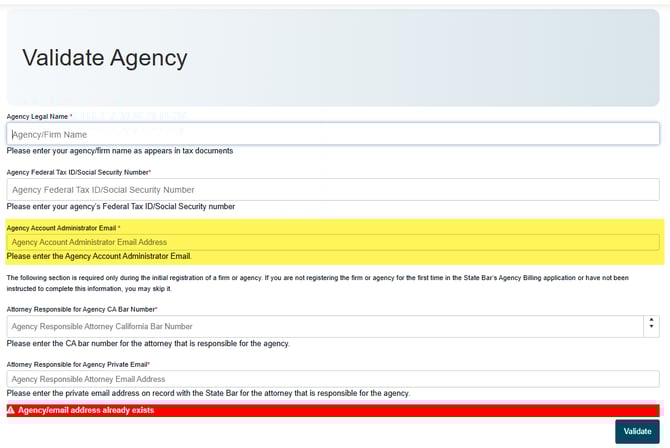
If you are registering a new agency and receive the error message “Agency/email address already exists,” this indicates that the Agency Account Administrator email address you entered is already associated with an existing account in our system.
The Agency Billing system does not allow duplicate accounts. Each organization’s account must be linked to a unique email address.
If you need to manage multiple accounts for different organizations, please provide a different, unique email address for each account.
Questions? Contact us.