![CA-StateBar_Logo_Horizontal_White_LargeSeal_.png]](https://info.calbar.ca.gov/hs-fs/hubfs/CA-StateBar_Logo_Horizontal_White_LargeSeal_.png?height=50&name=CA-StateBar_Logo_Horizontal_White_LargeSeal_.png)
The only voluntary license statuses are active, inactive and resigned. The State Bar does not have a retired status option.
Notifying the State Bar that you have retired does not change your status. You must formally request a status change. If you stop paying annual license fees or do not complete required Attorney Annual Renewal reporting requirements, your license will be placed on not eligible status.
Resignation of your license should be considered a permanent step, for attorneys who are certain they would not wish to practice law in California again. Re-admission after resignation would require a reinstatement petition in the State Bar Court, an expensive and time-consuming process which usually entails re-taking most of the bar exam.
Continue reading for detailed guidance on how to submit your request to voluntarily resign your license online through My State Bar Profile and frequently asked questions.
Note: Resignation fee
You must pay a non-refundable $85 fee to submit a voluntary resignation request. State Bar staff cannot waive, reduce, or refund this fee.
Why there is a fee
Business and Professions Code section 6001(c) authorizes the State Bar to charge fees for its services. A fee cannot exceed the reasonable cost of the service. It also cannot be charged to raise revenue for unrelated purposes.
In 2023, the California State Auditor issued a report on the State Bar. The report recommended that the State Bar raise any service fees that do not cover the cost of the service, unless doing so would limit public access to that service.
How the fee was set
The State Bar's Office of Finance calculated the staff workload involved in processing voluntary resignations. Based on that cost, it recommended an $85 fee in Board item 4.1, November 2024. The Board of Trustees approved the fee in its 2025 Schedule of Charges and Deadlines. The fee took effect when the Board adopted amendments to rule 2.45(B) of the Rules of the State Bar.
Submit a voluntary resignation request
Step 1: Log In
Go to My State Bar Profile and sign in using your bar number and password.
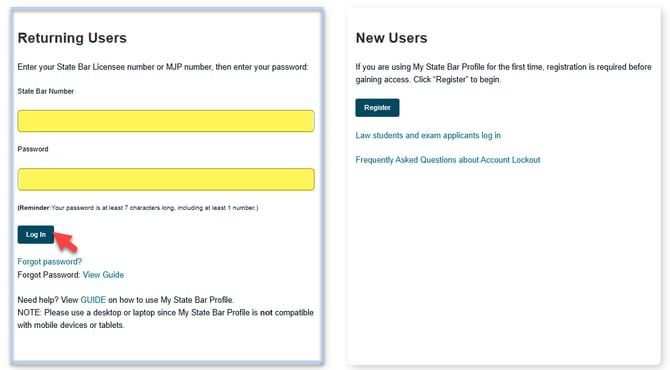
Forgot your password? View this guide. Do not remember your bar number? View this guide.
Step 2: Access Status Change Menu
From the main navigation bar at the top of your My State Bar Profile Summary page, select “Status Change.”

Step 3: Select “Voluntary Resignation” Option
Click “Voluntary Resignation” from the available options.

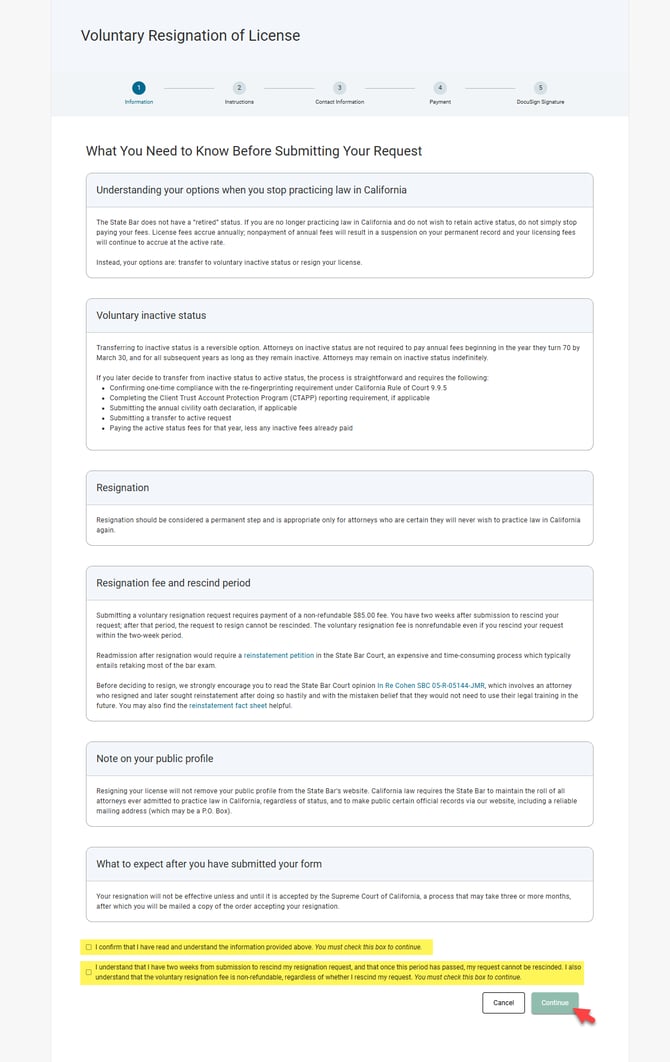
Step 4: Review Information Page
Carefully read the on-screen information about resigning.
Check the two boxes confirming you have read and understand the information. Click “Continue” to proceed.
Step 5: Review Instructions Page
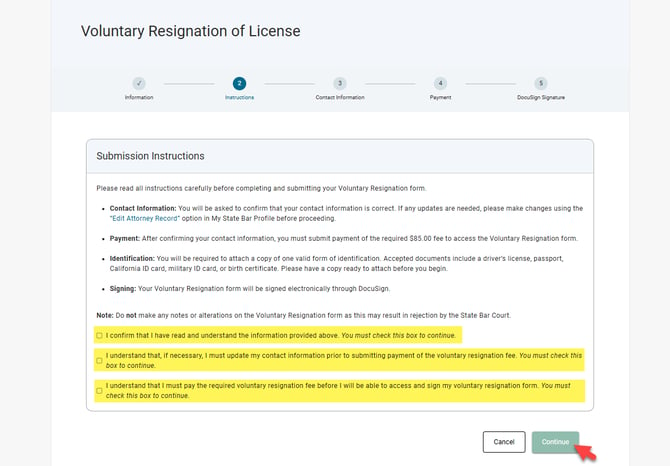
Next, carefully read the on-screen instructions.
Check the two boxes confirming you have read and understand the instructions. Click “Continue” to proceed.
Step 6: Review Your Contact Information
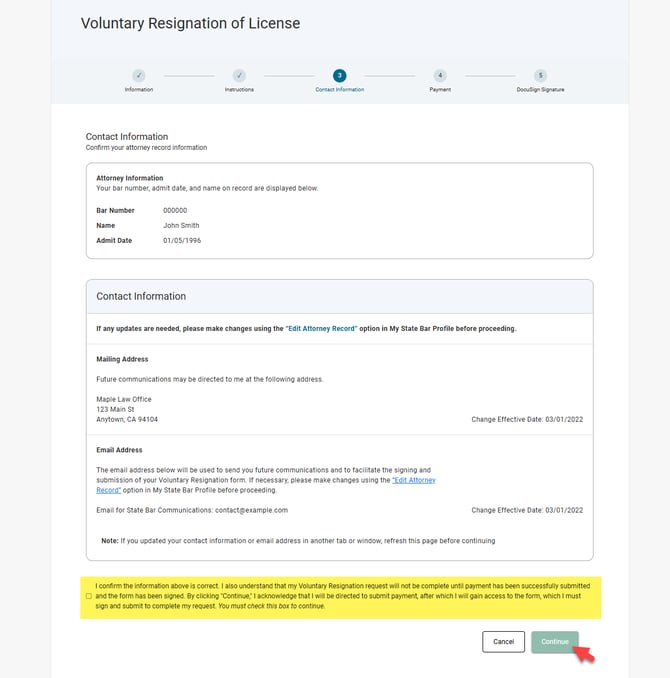
Review your name, bar number, and admission date. This information will be auto-populated on your Voluntary Resignation form. You cannot edit these fields.
Review your mailing address and email. Complete any necessary updates using the "Edit Attorney Record" link. If you edited your mailing address or email in another browser tab, refresh this page before you continue.
Check the box confirming your contact information is correct. Click “Continue” to proceed.
Step 7: Important Information Pop-Up
A pop-up will appear repeating key reminders.
Click “Confirm” to proceed.
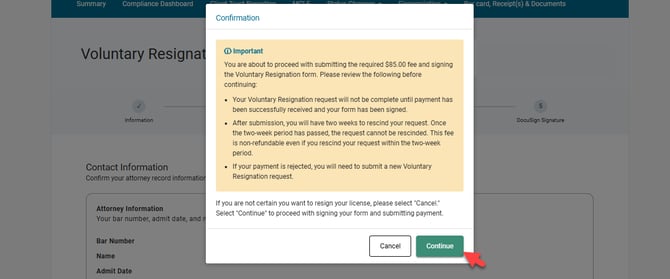
Step 8: Review Payment Page
Review the voluntary resignation fee payment page.
Click “Continue” to proceed.
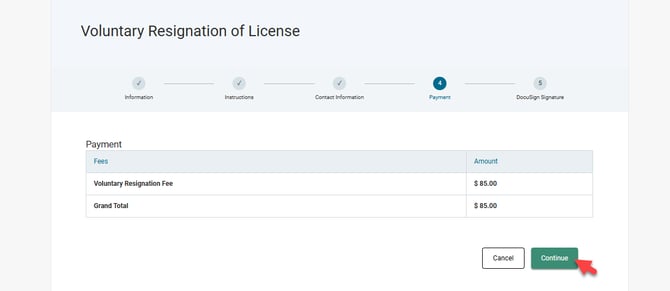
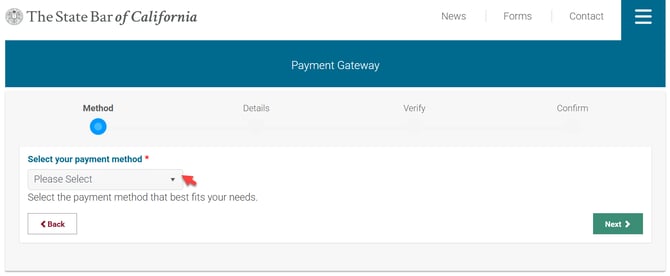
Step 9: Submit Payment
Select your payment method, either ACH (electronic check) or credit card, and click "Next" to proceed.
Note: You must use an active U.S. bank account to complete payment by ACH (electronic check).
Enter the required information for the payment method selected and click "Next" to proceed.
Note: Update the "Country" field to complete payment with an international credit card or with a U.S. bank account with an international billing address.
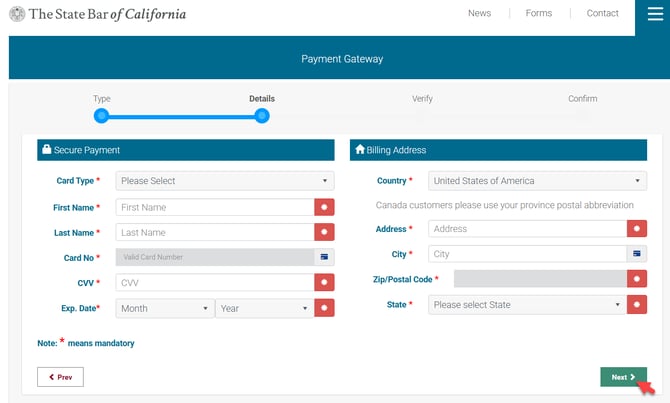
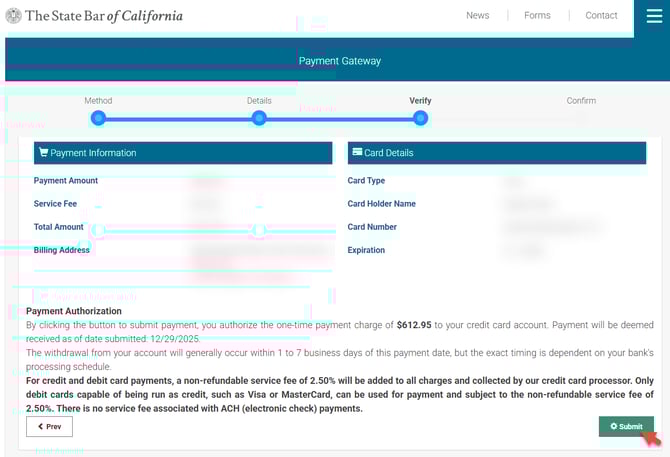
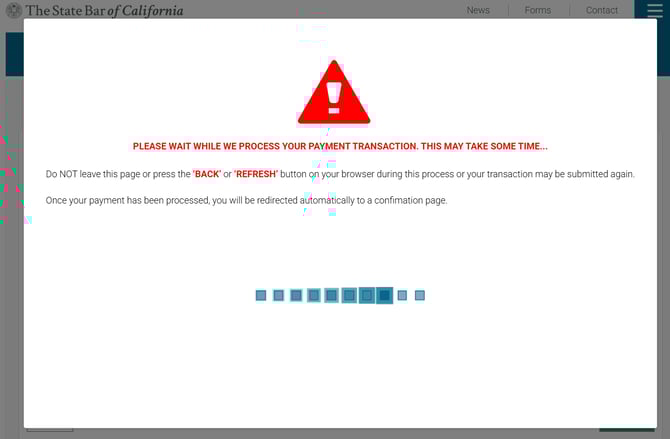
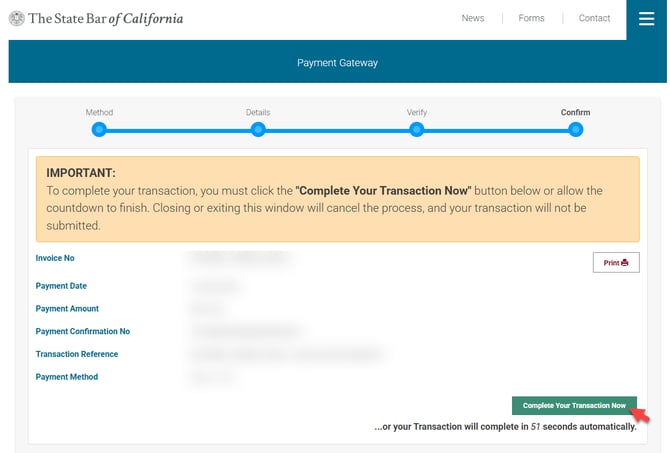
Finally, you will be asked to verify your submitted payment information. If changes are required, click "Prev" to return to prior screens. If no changes are required, click "Submit" to complete payment online.
Final Step: Sign Your Voluntary Resignation Form
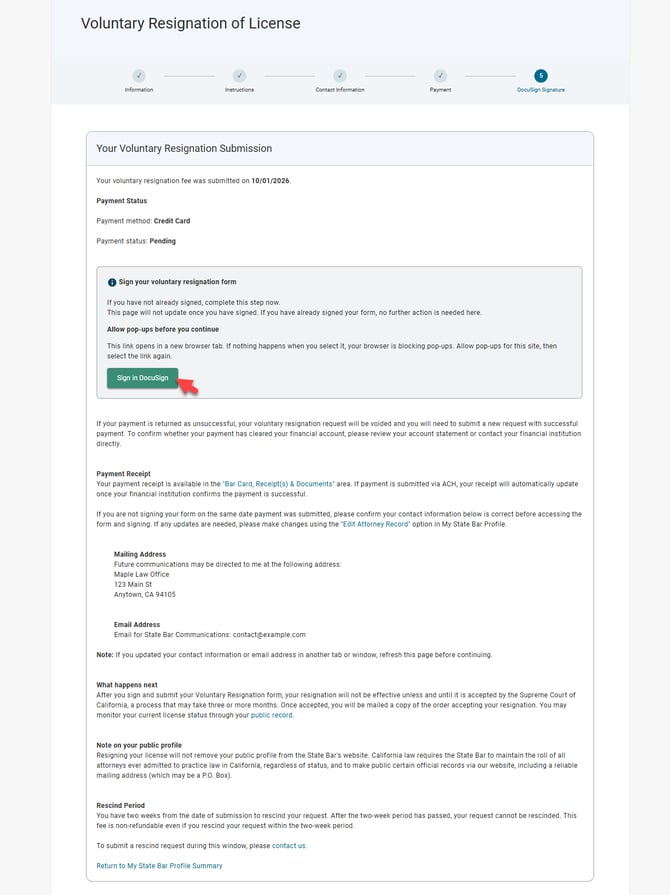
Note: The DocuSign form will open in a new browser tab. Please allow pop-ups before you click to access the form. If nothing happens when you select it, your browser is blocking pop-ups. Allow pop-ups for this site, then select the link again.
Note: Your voluntary resignation request is not complete until you sign and submit the Voluntary Resignation form. Complete this step promptly after you pay.
After You Submit
Receipt
Find your receipt in My State Bar Profile under "Bar card, Receipt(s) & Documents." ACH receipts update once the payment is confirmed.
Note on your public profile
Resigning your license will not remove your public profile from the State Bar's website. California law requires the State Bar to maintain the roll of all attorneys ever admitted to practice law in California, regardless of status, and to make public certain official records via our website, including a reliable mailing address (which may be a P.O. Box).
Rescind Period
Frequently Asked Questions
-
What is the difference between resigning and going inactive?
-
I paid but did not sign the DocuSign form. How do I get back to it?
1. Is my license resigned once I pay the fee?
No. You must also sign and submit the DocuSign form. Your request is not complete until the State Bar receives successful payment and the signed form.
2. Will I receive confirmation that my form is received?
Once you complete the form in DocuSign, you will receive a confirmation email from DocuSign verifying your submission.
3. Will I receive notice when my resignation is complete?
After you sign and submit your Voluntary Resignation form, your resignation will not be effective unless and until it is accepted by the Supreme Court of California, a process that may take three or more months.
However, upon tendering your resignation request to the State Bar of California, you will be placed on not eligible to practice status and you will be ineligible to practice law in California.
Once your resignation request is accepted, you will be mailed a copy of the order accepting your resignation.
You may monitor your license status through your public record.
4. What is the difference between resigning and going inactive?
Inactive attorneys maintain their license but cannot practice law while on inactive status. You may transfer to active at any time by submitting the required request form and completing any necessary requirements.
Resignation of your license should be considered a permanent step, for attorneys who are certain they would not wish to practice law in California again. To practice again after resigning, you must seek reinstatement. Review Step 1 of the online process for details.
5. How much is the fee, and can I get a refund?
The fee is $85. The voluntary resignation fee is nonrefundable even if you rescind your request within the two-week period.
6. Why am I being charged a resignation fee?
Business and Professions Code section 6001(c) authorizes the State Bar to charge fees for its services. A fee cannot exceed the reasonable cost of the service. It also cannot be charged to raise revenue for unrelated purposes.
In 2023, the California State Auditor issued a report on the State Bar. The report recommended that the State Bar raise any service fees that do not cover the cost of the service, unless doing so would limit public access to that service.
The State Bar's Office of Finance calculated the staff workload involved in processing voluntary resignations. Based on that cost, it recommended an $85 fee in Board item 4.1, November 2024. The Board of Trustees approved the fee in its 2025 Schedule of Charges and Deadlines. The fee took effect when the Board adopted amendments to rule 2.45(B) of the Rules of the State Bar.
7. Can I stop partway through?
Yes. Select "Cancel" on any step before payment. Nothing is submitted, and you can start again later at Step 1.
8. I paid but did not sign the DocuSign form. How do I get back to it?
Log in to My State Bar Profile and open Voluntary Resignation. Your status page will display the DocuSign link.
9. What do I need to sign the DocuSign form?
You will need to attach a copy of your government-issued photo ID.
10. I paid by ACH. Why does my payment still show as pending?
ACH payments stay in pending status until your bank confirms them. Your status and receipt update automatically once confirmed. It may take a few business days for the State Bar to receive confirmation of successful payment.
11. My ACH payment was rejected. What happens now?
You will receive an email notifying you of the rejected payment, and your resignation request is voided. Even if you already submitted a signed form, you will be required to start a new request at Step 1, submit a new payment, and sign a new form.
12. Can I submit more than one request?
No. While a request is pending you may not submit a duplicate request.
13. Where is my receipt?
In My State Bar Profile under "Bar card, Receipt(s) & Documents."
14. Can I rescind my resignation request?
Questions? Contact us.