![CA-StateBar_Logo_Horizontal_White_LargeSeal_.png]](https://info.calbar.ca.gov/hs-fs/hubfs/CA-StateBar_Logo_Horizontal_White_LargeSeal_.png?height=50&name=CA-StateBar_Logo_Horizontal_White_LargeSeal_.png)
Reporting requirements will vary depending on whether you are submitting a new application or renewing your registration with the State Bar. Please identify your application type and review the instructions below that correspond to your selection.
Annual Renewal
-
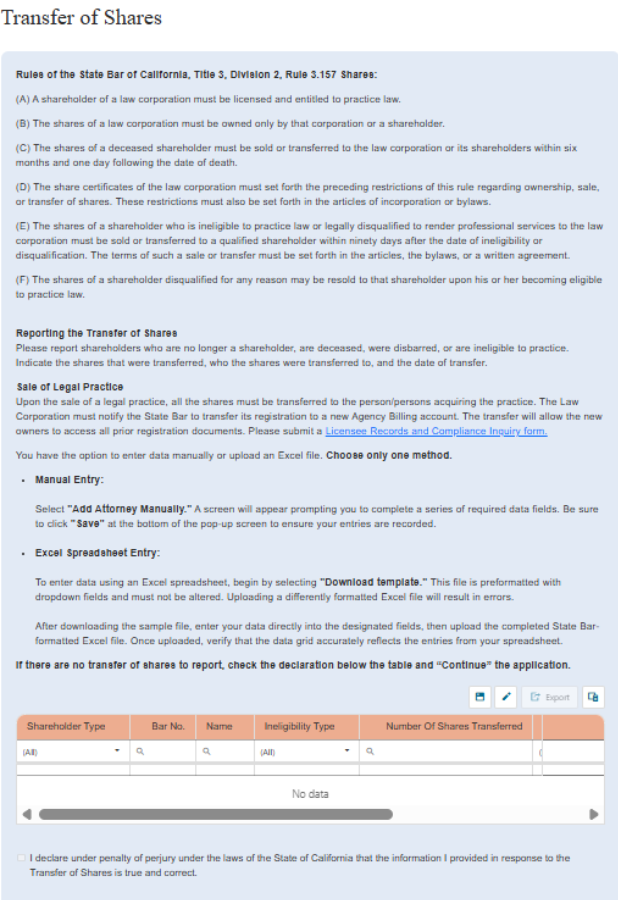
If no shares have been transferred, select the declaration and click “Continue” at the bottom of the page.
The Transfer of Shares can be reported one of two ways:
-
Manual Entry
-
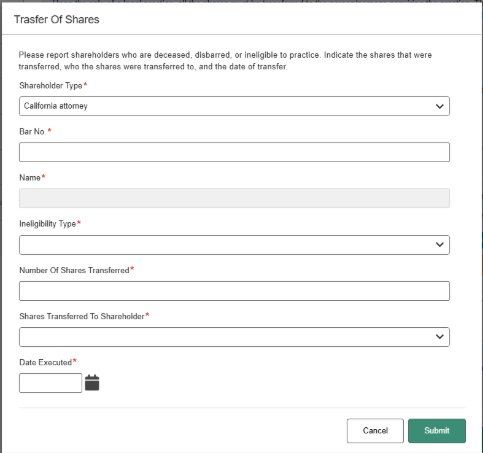
- If the firm would like to report the transfer of shares manually, click "Add Transfer of Shares Manually" and fill out the pop-up screen.
- Click “Submit” once the form is complete.
- Repeat as needed to report all shares transferred.
2. Upload an Excel Spreadsheet

-
- If the firm would like to report the transfer of shares by uploading an excel, first click "Download sample data grid" and open the downloaded file in Excel."
- If utilizing the spreadsheet, do not alter the format from the spreadsheet provided or it will fail to upload.
- Use font size 11 or greater when adding data to the Excel spreadsheet.
- After filling out all the fields, click save to save the file in a known location on your computer. Upload the complete spreadsheet using the "Upload Excel File" button.
Once the information on record is up to date, select the declaration and click “Continue” at the bottom of the page.
New Registration Application
-
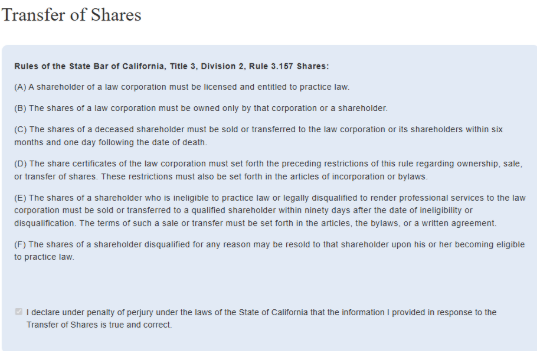
Read rule 3.157 Shares.
-
Select the declaration.
-
Click “Continue” at the bottom of the page.