![CA-StateBar_Logo_Horizontal_White_LargeSeal_.png]](https://info.calbar.ca.gov/hs-fs/hubfs/CA-StateBar_Logo_Horizontal_White_LargeSeal_.png?height=50&name=CA-StateBar_Logo_Horizontal_White_LargeSeal_.png)
Reporting requirements will vary depending on whether you are submitting a new application or renewing your registration with the State Bar. Please identify your application type and review the instructions below that correspond to your selection.
Annual Renewal
Is the LC attempting to renew its registration, and is this the first time it has submitted the application online?
If this is the LC's first year submitting an online renewal application through Agency Billing, please follow the instructions for the New Registration Application below.
Is the LC attempting to renew its registration and has it already submitted the application online in a prior renewal cycle?
If yes, the information submitted in the previous renewal cycle is already available. Please follow the steps below to complete the process:
- Review the list of attorneys in the table to confirm the information is correct.
-
- Manual Entry:
- Edit existing attorneys by selecting the “Edit” button in the corresponding attorney row.
- Add new attorneys by selecting “Add Attorney Manually,” complete the pop-up screen, and click “Save” when done.
- Repeat as needed to report all attorneys.
- Upload an Excel Spreadsheet:
- Report multiple attorneys by uploading an excel, first click "Download sample data grid" and open the downloaded file in Excel."
- Manual Entry:
-
-
- If utilizing the spreadsheet, do not alter the format from the spreadsheet provided or it will fail to upload.
- Use font size 11 or greater when adding data to the Excel spreadsheet.
- After filling out all the fields, click save to save the file in a known location on your computer. Upload the complete spreadsheet using the "Upload Excel File" button.
-
2. Once the information on record is up to date, click “Continue” at the bottom of the page.
⇒ Please Note: For more information on State Bar Rules relating to attorneys and attorney relationship types, see below the New Registration Application instructions.
New Registration Application
1. Add the attorneys practicing under the Law Corporation and indicate:
- Attorney Type – indicate if staff are licensed to practice in California, outside of California (non-CA), or if a person is not licensed to practice law.
- Bar No – of California licensed attorneys.
- Name – will pre-generate when a California Bar No is entered.
- Multi Jurisdiction –attorneys can report a second jurisdiction where they were admitted to practice and have an active license. It is at the discretion of the attorney to indicate which additional jurisdiction to report.
- Attorney Relationship Type – the relationship type (Employee, Partnership, In Association, Of Counsel) must be determined by LC.
⇒ Please Note: Shareholders that practice law on behalf of the LC must also be reported in the Attorney Segment.
The attorneys can be reported one of two ways:
- Manual Entry:
- If the firm would like to report attorneys manually, click "Add Attorney Manually" and fill out the pop-up screen.
- When enterng a California licensed-attorney, the application will automatically add the official name on record when a Bar number is entered. A Bar number displaying an inactive, not eligible, disbarred, or retired status cannot be added. The system will show an error message for any of these statuses.
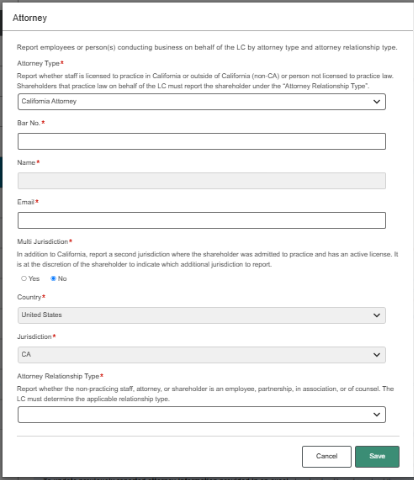
- Click “Save” once the form is complete.
- Repeat as needed to report all attorneys.
- When enterng a California licensed-attorney, the application will automatically add the official name on record when a Bar number is entered. A Bar number displaying an inactive, not eligible, disbarred, or retired status cannot be added. The system will show an error message for any of these statuses.
- If the firm would like to report attorneys manually, click "Add Attorney Manually" and fill out the pop-up screen.
- Upload an Excel Spreadsheet:

-
- If the firm would like to report attorneys by uploading an excel, first click "Download sample data grid" and open the downloaded file in Excel.
- If utilizing the spreadsheet, do not alter the format from the spreadsheet provided or it will fail to upload.
- Use font size 11 or greater when adding data to the Excel spreadsheet.
- After filling out all the fields, click save to "Save" the file in a known location on your computer. Upload the complete spreadsheet using the "Upload Excel File" button.
2. Once the information on record is up to date, click “Continue” at the bottom of the page.
Reporting Attorneys practicing on behalf of the Law Corp
Law Corps must report attorneys conducting business on behalf of the Law Corporation. The number of attorneys is used to calculate the guarantee. Attorneys can be listed in one of two ways and should only be accounted for once:
- Attorney Segment – List all individual attorneys who conduct or may conduct business on behalf of the Law Corporation.
- Business Relationship Segment - List the number of attorneys who, through a business relationship with a Limited Liability Partnership and/or a different Law Corporation, conduct or may conduct business on behalf of the Law Corporation.
Attorney Relationship Types include:
- Attorneys and shareholders who practice law on behalf of the corporation, as an employee or otherwise.
- The shareholder/s email listed in this section must match the email listed in the "Shareholder" segment.
- A partnership in which the law corporation is a partner and that the law corporation holds out as being of counsel or otherwise available to practice law on behalf of the law corporation.
- Any association that has a continuous relationship with the law corporation for the practice of law.
- Any association, with the consent of the law corporation, that holds out as being of counsel or otherwise available to practice law on behalf of the association.