![CA-StateBar_Logo_Horizontal_White_LargeSeal_.png]](https://info.calbar.ca.gov/hs-fs/hubfs/CA-StateBar_Logo_Horizontal_White_LargeSeal_.png?height=50&name=CA-StateBar_Logo_Horizontal_White_LargeSeal_.png)
Annual Renewal
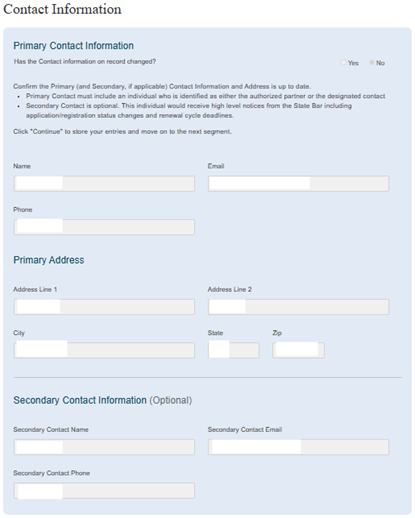
1. Review the information on record in the segment and answer the question at the top of the page. “Has the contact information on record changed?”
- If the information has changed, select “Yes,” and update the information. Instructions on the required fields are provided below.
- If the information has not changed, select “No.”
2. Once the information on record is up to date, click “Continue” at the bottom of the page.
New Application
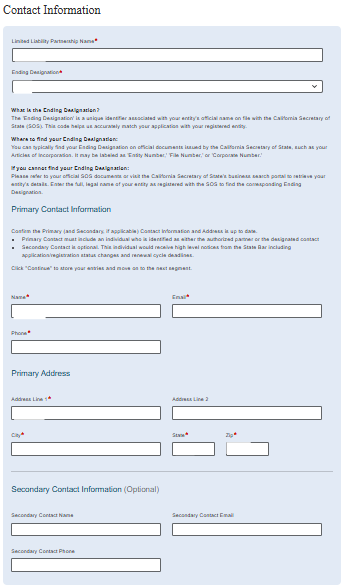
- Add the name of the Limited Liability Partnership.
- Add the ending designation.
- Add primary contact information.
- Only include the name. Do not include the ending designation in the name.
- Refer to the SOS document if unsure of the ending designation.
- Primary Contact must include an individual who is identified as either a partner or the authorized contact
- All field must be completed.
- Do not enter a phone number or extension in the Primary Contact “Name” field.
Please Note: Notices regarding applications and deadlines will be sent to primary contact.
Secondary Contact Information
- (Optional) Enter the secondary contact information.
- If you choose to provide secondary contact information, ensure all fields are completed.
- The secondary contact allows the State Bar to reach the LLP if the primary contact is unavailable or if there is a change in registration status.
- Once the information is entered, click “Continue” at the bottom of the page.
Please note: The secondary contact will not receive routine or status update notices on pending applications.